Growth
A/B testing for e‑commerce: how to test and sell more
How to plan, run and read an A/B test on an online store: hypotheses, sample size, statistical significance, SEO, tools and what to test first on Shopify.
- Author
- Skrey team
- Date
- 21 October 2026
- Reading time
- 10 min read
- Topic
- Growth
Almost every store has a list of ideas to sell more: change the product page, shorten checkout, move the reviews. Having ideas isn't the hard part; knowing which ones work is. An A/B test answers that with data instead of opinions.
This guide covers how an A/B test works, how to work out how long it should run, how to read results without falling into the usual traps and what to test first on a Shopify store. With one difference from most guides: it's written for stores with Portuguese‑sized traffic, rarely that of a US store.
What is an A/B test
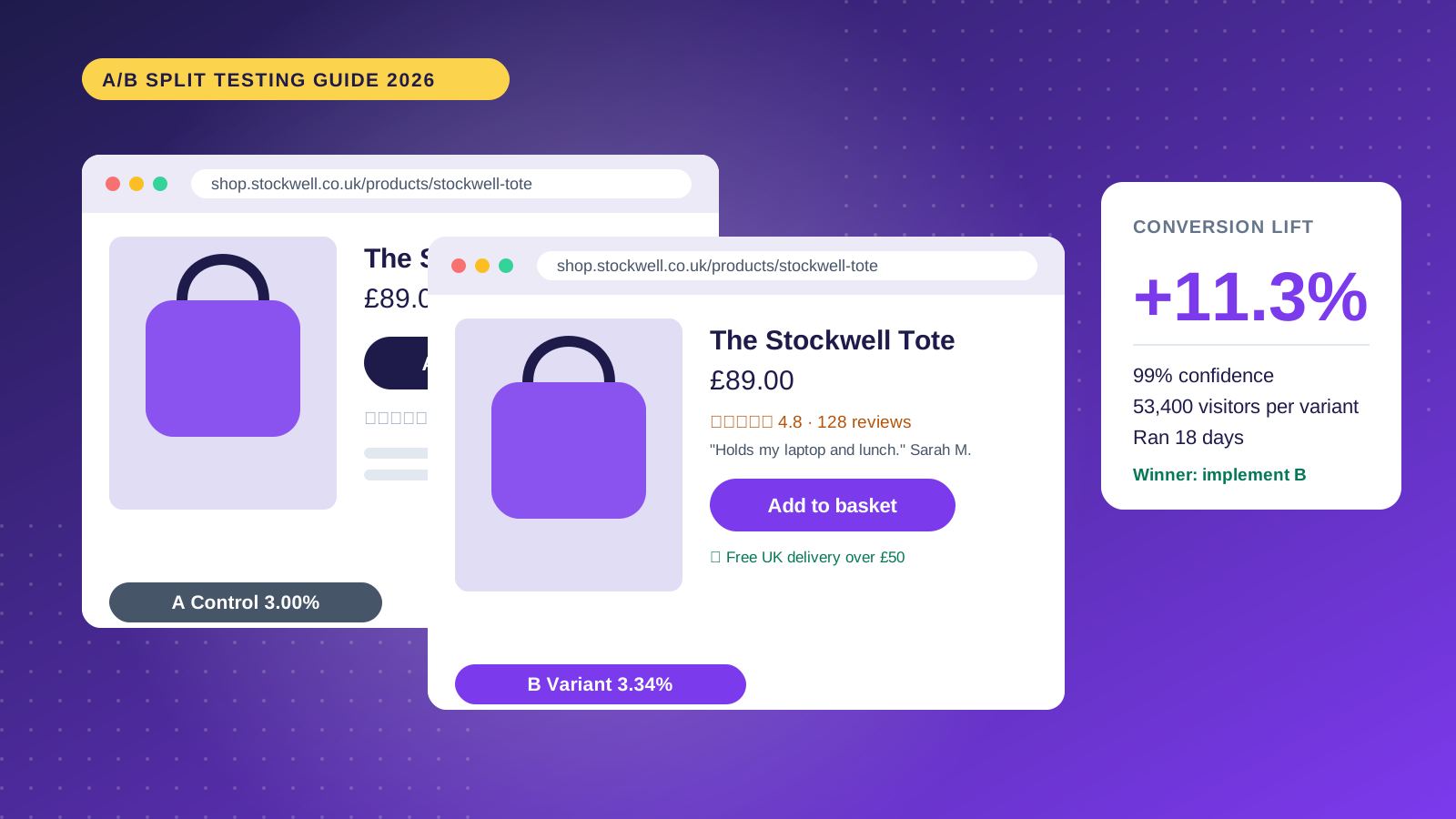
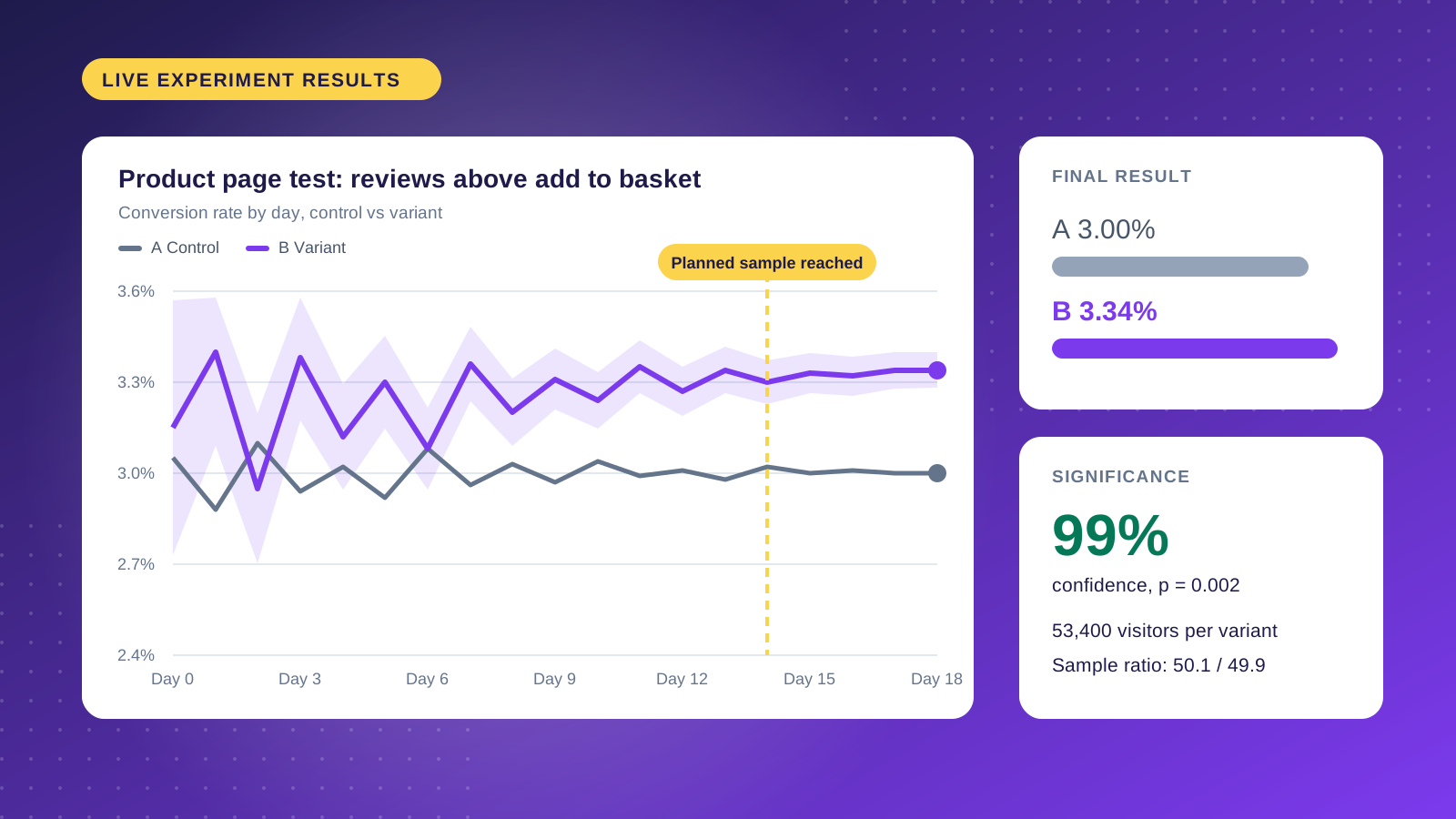
In an A/B test, part of your visitors see the current page (the control) and the rest see a changed version (the variant), at the same time. At the end you compare one metric chosen up front, such as conversion rate.
- Find a problem or an opportunity in the data.
- Build the variant, with one clear change.
- Split traffic at random, usually 50/50.
- Collect data until you reach the planned sample.
- Ship the winner, or record what you learned.
Why testing pays off
The teams that test the most agree: most ideas don't improve anything. Ronny Kohavi, who led experimentation at Microsoft and Amazon, reports that about a third of ideas win, a third make no difference and a third make things worse. Without testing, the last two ship too.
Gains also compound. A store turning over €100k a month that lifts conversion by 5% earns €5k more every month, without spending more on media. And every test after that starts from a better baseline.
A/B, split URL and multivariate
A/B test
Both versions live on the same URL and the tool decides which one each visitor sees. It's the fastest format and suits most changes.
Split URL
Control and variant sit on different URLs and part of the traffic is redirected. It makes sense for large redesigns but takes more development and SEO care.
Multivariate
Tests several changes at once and every combination of them. Three elements with two options each already make eight versions, so it only works with a lot of traffic and conversions.
How to run an A/B test, step by step
1. Start from data
Begin with Google Analytics, heatmaps, session recordings, reviews and support tickets. Find where visitors drop off and why. Set a concrete goal, such as raising add‑to‑cart rate on the product page without lowering average order value.
2. Write the hypothesis
A good hypothesis states what will change, what you expect and why: "If we show the delivery time next to the buy button, more people will add to cart, because the most common support question is when the order arrives." Even if the variant loses, you learn something about your customers.
3. Choose the metrics
- One primary metric, such as conversion rate or revenue per visitor, with the minimum gain that justifies the change.
- Secondary metrics to understand behaviour: add to cart, checkout started.
- Guardrail metrics that must not get worse: average order value, returns, page speed.
4. Pick the tool
It depends on the platform, the team and the traffic. We cover the options further down.
5. Build the variant
Change one thing, or one well‑defined concept. Change the headline, the images and the button at once and you won't know what made the difference. Two or three variants are enough; more split the traffic and stretch the test.
6. Work out sample size and duration
Before you start, work out how many visitors you need. The inputs are the current conversion rate, the smallest effect you want to detect and the confidence level (usually 95%, with 80% power).
7. Analyse and decide
Read the results only once you reach the planned sample. If the variant wins, ship it. If it loses or ties, record what you learned. If the result surprises you, split it by device and by new and returning visitors before drawing conclusions.
What to test on an online store
- Headlines and copy: the value proposition, the benefits, the tone.
- Buttons and calls to action: wording, size, position, contrast.
- Landing pages: hero image, trust signals, section order.
- Forms: number of fields, order, optional fields.
- Images and video: product shots, in‑use photos, short video.
- Prices and offers: free shipping, discounts in percent or in euros, bundles.
- Navigation: menus, filters, default sort.
- Social proof: reviews, customer counts, trust badges.
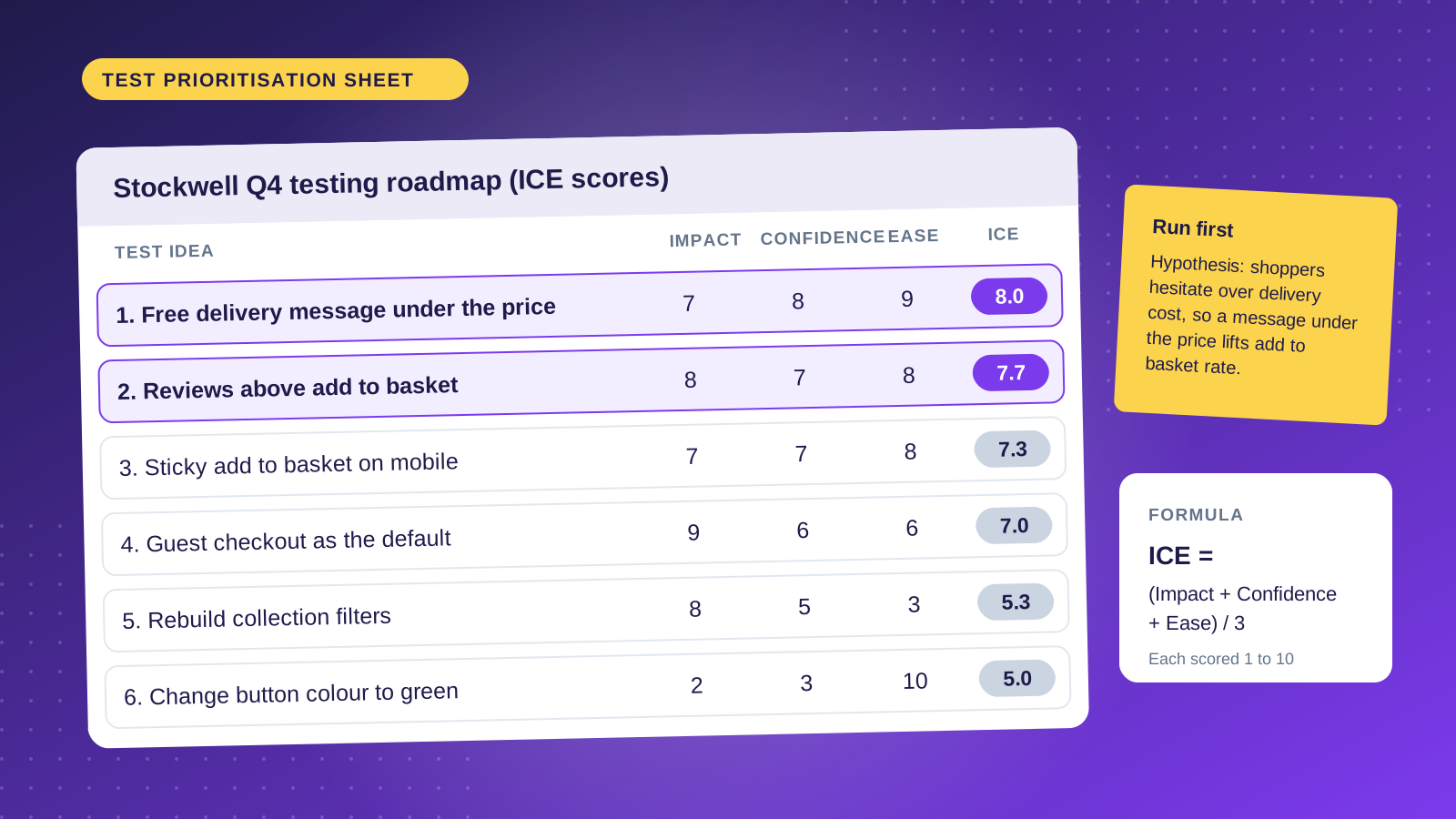
To decide where to start, score each idea from 1 to 10 on impact, confidence and ease (the ICE method) and begin with the highest totals.
Statistical significance, kept simple
A variant with 12% more conversions isn't a winner on its own. With a small sample, large differences show up by chance. The standard is 95% confidence: if there's no real difference, there's less than a 5% chance of seeing a result like this.
Three things matter: sample size, effect size and the starting conversion rate. Small effects and low conversion rates need far more traffic.
Frequentist or Bayesian
The frequentist method fixes the sample up front and gives a p‑value at the end. The Bayesian method gives the probability that the variant is better and updates as data comes in. Both work, as long as the stopping rule is agreed before you start.
Peeking and unbalanced samples
Checking results every day and stopping when they look good is the most common mistake. With ten peeks, the chance of a false positive goes from 5% to close to 20%. Another warning sign is an unbalanced split: if you set 50/50 and get 53/47, something technical is wrong (redirects, caching, bots) and the results can't be trusted.
Does A/B testing hurt SEO?
Not if you follow Google's testing guidelines:
- Don't show Googlebot a different version from the one visitors see.
- On variants with their own URL, use a canonical tag pointing to the original page.
- Use 302 (temporary) redirects, not 301.
- End the test once there's a winner and publish the final version.
Watch page speed too: tools that swap content in the browser can slow loading and hurt LCP. Server‑side tests avoid that.
A/B testing tools
Google Optimize shut down in 2023 and the market split between tools for marketing teams and platforms for product teams:
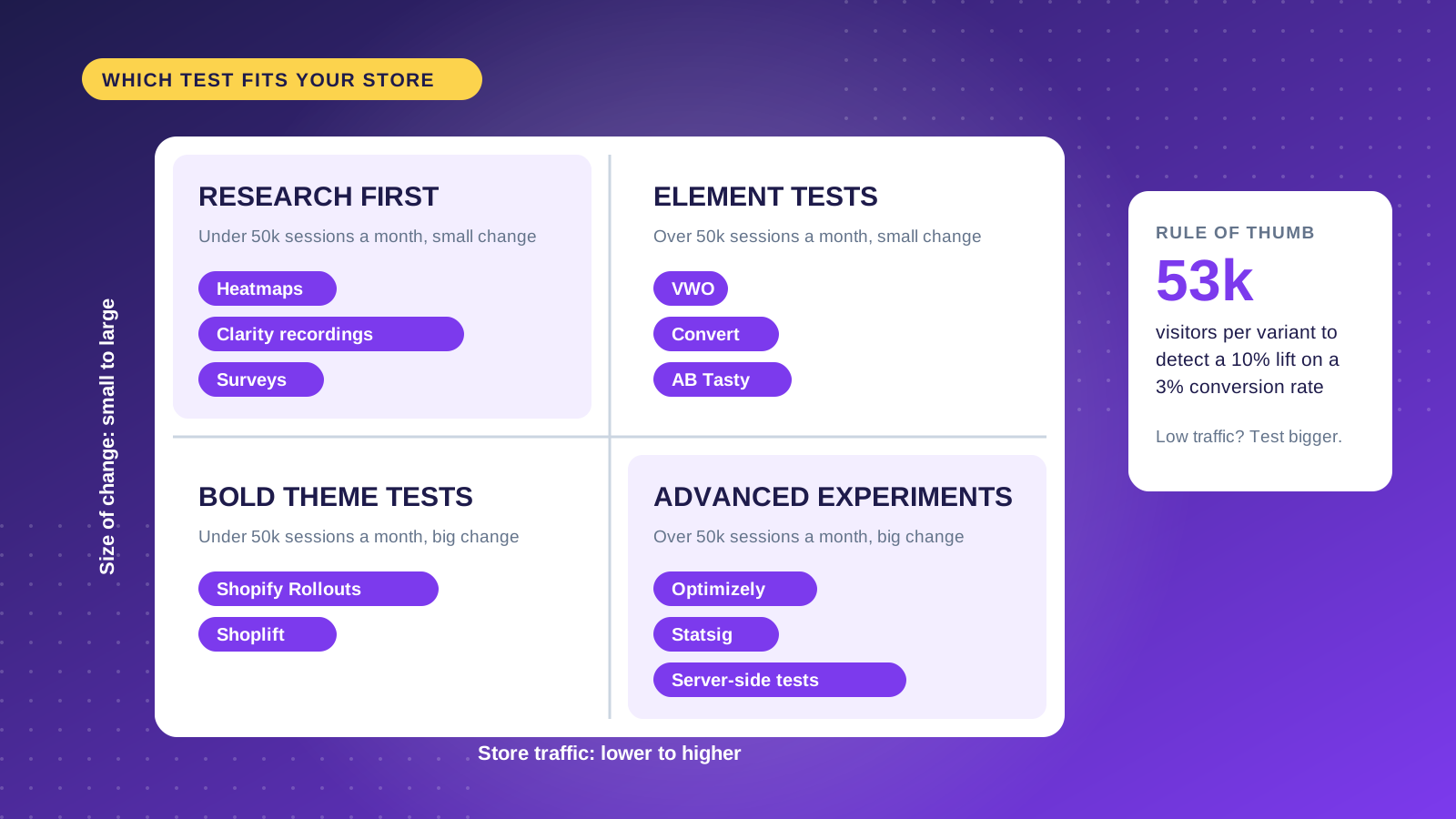
- Optimizely: the enterprise reference, with browser and server‑side testing.
- VWO: A/B tests with heatmaps, recordings and form analytics.
- AB Tasty: European, with a good answer to GDPR.
- Convert: privacy‑focused, without relying on third‑party cookies.
- LaunchDarkly and Statsig: feature flags and server‑side tests for engineering teams.
On Shopify, native tools and apps built for the platform usually integrate better and weigh less on the store.
A/B testing on Shopify
Product pages
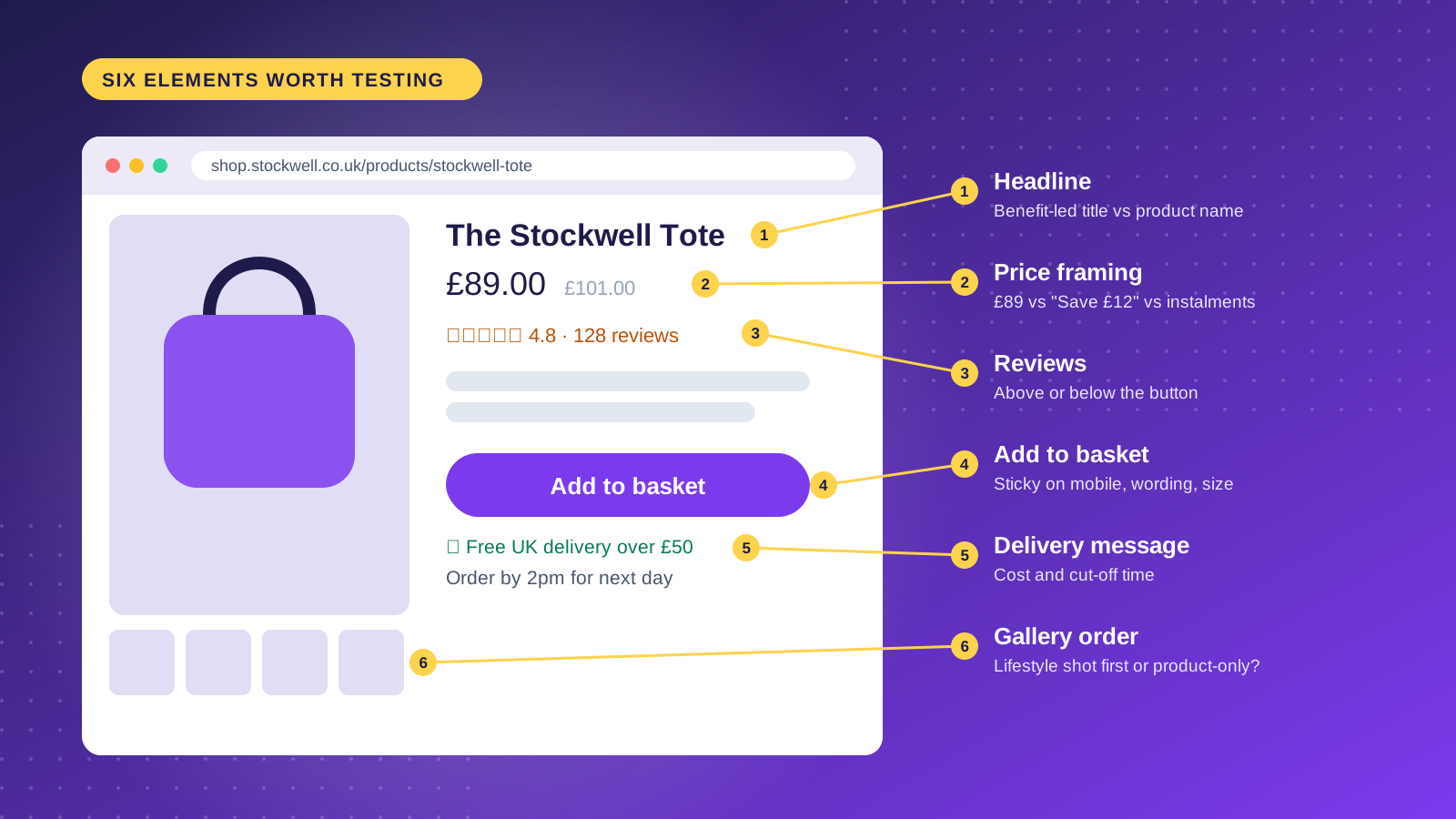
They're the most tested pages, and for good reason. Test the image gallery, the order of description and reviews, social proof near the price, delivery time next to the button and a simpler buy box. Layout changes tend to move the numbers more than copy changes.
Collections
Grid or list, products per page, more or less visible filters and the default sort.
Cart and checkout
About seven in ten carts are abandoned. Test guest checkout, fewer fields, trust signals and payment methods in view; in Portugal, MB WAY and Multibanco make a difference. Checkout can only be deeply customised on Shopify Plus.
Shopify Rollouts
Shopify now has native testing, Rollouts, under Markets > Rollouts: schedule changes and compare two versions of the theme with part of the traffic. Availability and options depend on the plan, and tests are limited to theme changes.
Testing apps
For price tests, content tests or specific pages, apps such as Shoplift integrate with the theme without heavy injected scripts and show results inside Shopify.
Common mistakes
- Stopping early, as soon as the variant looks like it's winning.
- Changing too much in one variant.
- Ignoring device: what wins on desktop can lose on mobile.
- Deciding by the loudest opinion in the room instead of the data.
- Not segmenting results when they're unexpected.
- Mistaking novelty for improvement: a change grabs attention for a few days, then the effect fades.
- Forgetting consent: in the EU, testing tools must respect GDPR and the cookie banner too.
- Not recording what you learned, and repeating tests already run.
A/B testing with a Portuguese store's traffic
Most guides assume hundreds of thousands of visits a month. In Portugal, a good store often has 20,000 to 80,000 monthly sessions. That doesn't rule out testing, but it changes how you do it:
- Test big changes that could move 15% or more, rather than details that take months to show a result.
- Test where the traffic is: product page and cart, not the About page.
- Use revenue per visitor when conversion is low: it combines conversion and order value and shows gains conversion rate alone hides.
- Run an A/A test first, with two identical versions, to confirm the tool splits traffic properly and the numbers match Shopify orders.
- Don't forget local payments: MB WAY, Multibanco and delivery times to the mainland and islands are among the highest‑impact changes we see.
Building a testing culture
- A testing roadmap, with prioritised ideas and an owner for each.
- Priorities by ICE: impact, confidence and ease.
- A record of every test: hypothesis, result, screenshots and decision.
- Realistic expectations: many tests tie, and the winners bring 5% to 15% lifts. Added up over a year, they make a difference.
On a store with average traffic, one bold test a quarter teaches more than ten tests on a button colour.
Most Portuguese stores don't have the traffic to detect 2% or 3% gains in reasonable time. For them, it pays to test big changes, such as a new product page or a different shipping model, and to do qualitative research first. Stores with fewer than a thousand visits a month should start with interviews, session recordings and review analysis.
FAQ
How do you run an A/B test?
Start from a problem in the data, write a hypothesis, build a variant with one clear change, split traffic in half and wait for the calculated sample before deciding.
What's the difference between an A/A and an A/B test?
In an A/A test both versions are identical: it validates the tool and the traffic split. In an A/B test the variant has a change, and that's what you measure.
Are there free A/B testing tools?
Google Optimize shut down in 2023. On Shopify, native Rollouts cost nothing extra for theme changes; other tools are paid, some with entry plans or trials.
How long should an A/B test run?
As long as it takes to reach the calculated sample, and never less than two full weeks.
How much traffic do I need?
It depends on conversion and the effect you want to detect. With 3% conversion and a 10% lift, about 50,000 visits per variant.
How do you A/B test on Shopify?
Yes, with native Rollouts for theme changes or with apps like Shoplift for more specific tests.
What's a good lift?
5% to 20% is a good result. Above 50%, check the setup before celebrating.
Does A/B testing hurt SEO?
Not if you follow Google's rules: no cloaking, canonical on variants, 302 redirects and tests that end.
We run A/B tests on Shopify stores as part of our Growth and consulting work. If you want to know what to test first on your store, get in touch.